Stop losing track.
Start shipping offers.
Every application, every contact, every follow-up, in one dashboard. Run your job search the way a good sales rep runs a pipeline.
Why a real pipeline beats a spreadsheet
What systematic tracking is worth
-30%
less time spent on the search when applications are tracked systematically.
60%
of candidates forget the follow-up step that often decides the role.
10×
higher offer rate when active networking is part of the search.
Job Application Tracker
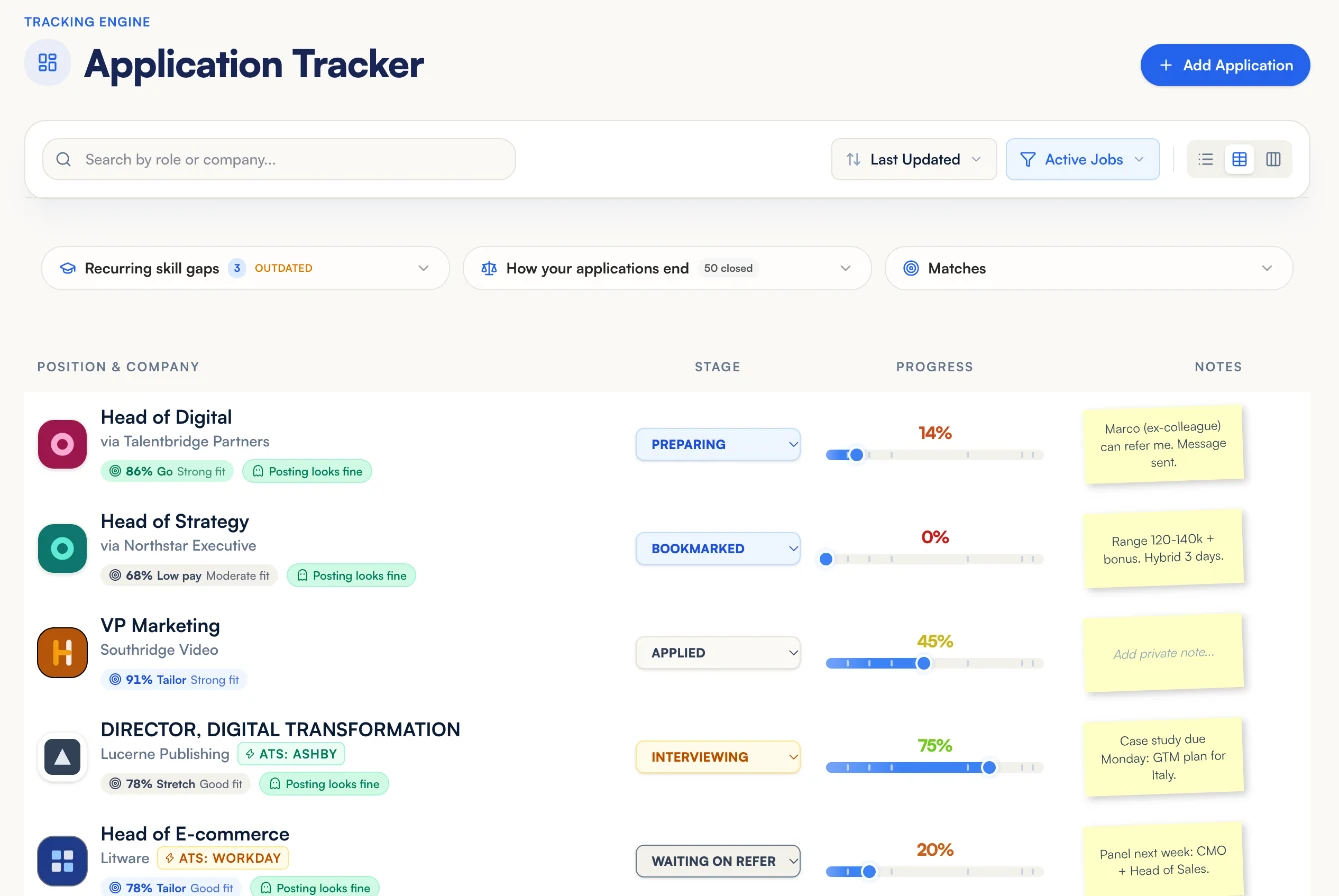
A kanban of every role you've saved, applied to, or heard back from. Deadline reminders, follow-up nudges, status history.
Networking CRM
Save referrers, recruiters, and past colleagues. Log every interaction, set follow-up reminders, never let a lead go cold.
Why spreadsheets are costing you offers
Anyone who's run a serious job search knows the feeling: forty open applications, three conversations in progress, a referrer you meant to follow up with two weeks ago, and a spreadsheet that hasn't been updated in ten days because updating it is nobody's favorite Monday task.
The research keeps finding the same result: candidates who actively network are roughly ten times more likely to land the role. But 'networking' in practice means remembering who you talked to, what they said, what you agreed to do next, and actually doing it, under the cognitive load of also interviewing, also working your current job, also managing rejection.
The CRM pillar solves the execution layer. The Job Application Tracker is a kanban pipeline, saved, applied, interviewing, offer, rejected, with application history, role details, and deadline reminders. It's not a spreadsheet with prettier columns; it's integrated with the rest of JobMentis, so the cover letter you generated for a role is already attached to that application, the mock interview you ran is in the same view, and the contact who referred you is one click away.
The Networking CRM tracks the humans. Recruiters, referrers, past managers, people you met at conferences. Every interaction logged with a note, every open thread with a follow-up reminder, every relationship strength visible at a glance. When you add a new target company, it surfaces who in your network works there. When a reply goes cold, it tells you.
Teal and Huntr do parts of this well. The integration with your resume, cover letter, Story Bank, WorkFive DNA, and AI Risk profile, that's where JobMentis earns the CRM pillar, not just by tracking applications, but by tracking them inside the career operating system that generated them.
FAQ
Frequently asked questions about the CRM
How is this different from Teal or Huntr?
Teal and Huntr are good standalone trackers. JobMentis is an integrated career workspace, the tracker sits next to your resume optimizer, your cover letter generator, your Story Bank, and your WorkFive profile. When you tag a role as 'applied,' the cover letter is already attached; when you schedule an interview, the relevant stories are one click away. The tracker alone isn't the value; the integration is.
Is there a Chrome extension to save jobs from LinkedIn?
Yes. The JobMentis browser extension for Chrome saves a job from LinkedIn, Indeed, Glassdoor or a company careers page to your tracker in one click, and shows your match, the pay and whether the posting still looks live. Without it, you can paste a job URL and get the role parsed into the tracker with title, company, description and deadline pre-filled.
How do follow-up reminders work?
Set a follow-up date per application or per contact. You'll get an email and in-app nudge on that date. Reminders compound, if you hit snooze twice, the nudge escalates. The point is to make 'I'll follow up next week' an actual follow-up next week, not a regret in month three.
Can I log contacts I already know, or just people I meet through JobMentis?
Both. Import by email or add manually. Tag contacts by relationship (recruiter, referrer, past manager, peer), company, and strength. The Networking CRM is designed for your entire professional network, not just new leads.
Is the CRM free?
The Job Application Tracker and the Networking CRM are both available on the free plan with sensible limits on saved roles and saved contacts. Unlimited roles, unlimited contacts, and automation features are part of Pro.
What about privacy, is my network data safe?
Your contact list is private to your account and encrypted at rest. We don't sell contact data, and we don't surface your network to other users. The only integration is the one you explicitly opt in to (calendar, email, both optional).
One workspace. Four pillars. Every tool that matters.
Go back to the start and see how the full JobMentis career operating system fits together.
See all pillars