Job application tracker
JobMentis: the job application tracker that scores every job against your CV
JobMentis keeps every application on one board and scores each job against your real CV on skills, experience, stories and career direction, then says plainly whether to apply. Every job gets a workspace for the CV you sent, your notes, contacts, referrals and interview prep. Tracking is free and unlimited.
Free and unlimited. No credit card.
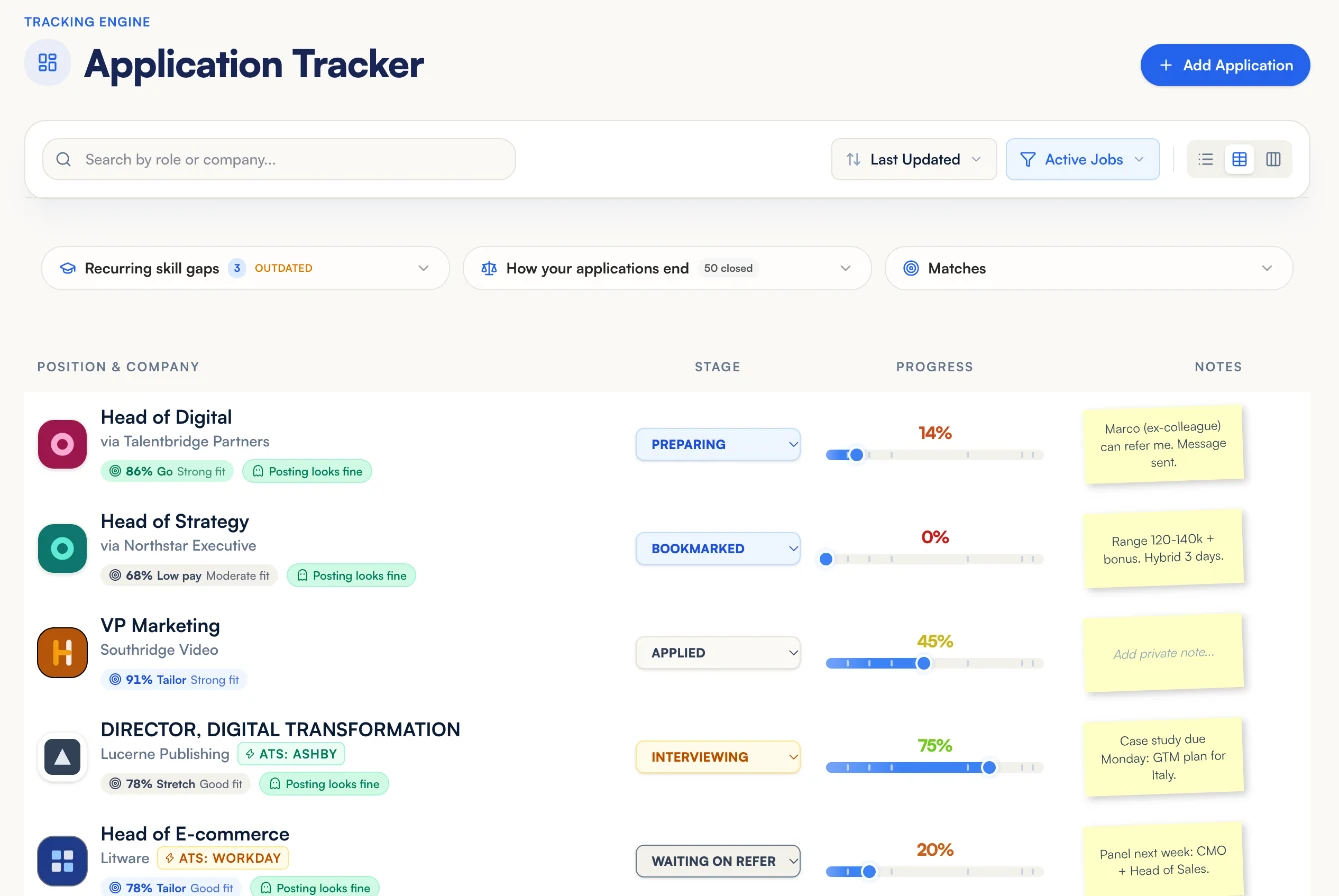
The job tracker in a minute
One board, a fit score you can check, and a workspace that remembers which CV you sent.
Sixty seconds, start to finish: a job lands on your board, its fit score explains itself, the workspace keeps the CV you sent with your notes and referrals, and posting health warns you before you spend an application on a job that has quietly closed.
Where does each application stand?
On one board, from the first bookmark to the offer. Each row shows the stage, how far the application has come, its fit score, whether the posting still looks live and the note you left yourself. Switch between a list, a table and a Kanban board, and filter to the jobs still in play.
- Stages run from Bookmarked and Preparing through Applied, Interviewing and Negotiating to the offer. Rejected, No answer and Position closed take a job off the active list without losing it.
- A Waiting on referral stage for the jobs where you ask someone inside before you apply.
- No limit on applications on the free plan: it is your own list, so there is nothing to ration.
- A nudge in Next Steps when an application has gone quiet for too long.
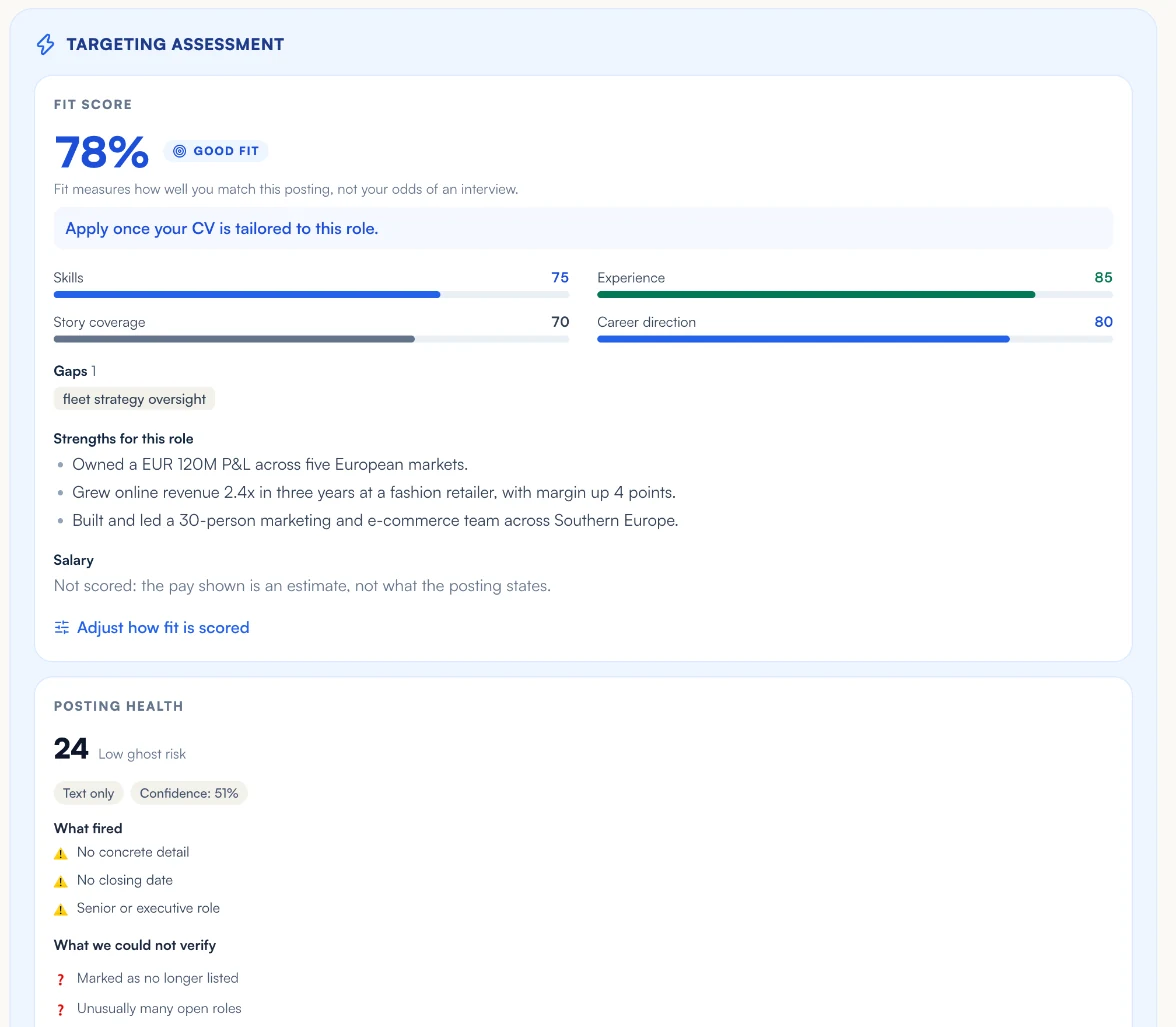
Should you apply? A fit score you can check
Every job is scored against your real CV on four dimensions: skills (35%), experience (30%), the stories that prove them (20%) and career direction (15%). The weighting is fixed arithmetic, not a model's mood, and the verdict comes with its reason: Go, Tailor, Stretch, Low pay or Skip.
- The same posting and the same CV give the same score: a second save does not move the number.
- Each gap is named (a skill, missing evidence, a level or a direction mismatch), and "What this job still needs" turns it into a next step: use a story, write one, or add the skill to your CV.
- Pay counts only when the posting states it. An estimated salary never moves your score.
- On Pro you can set your own weights, if experience matters more to you than direction.
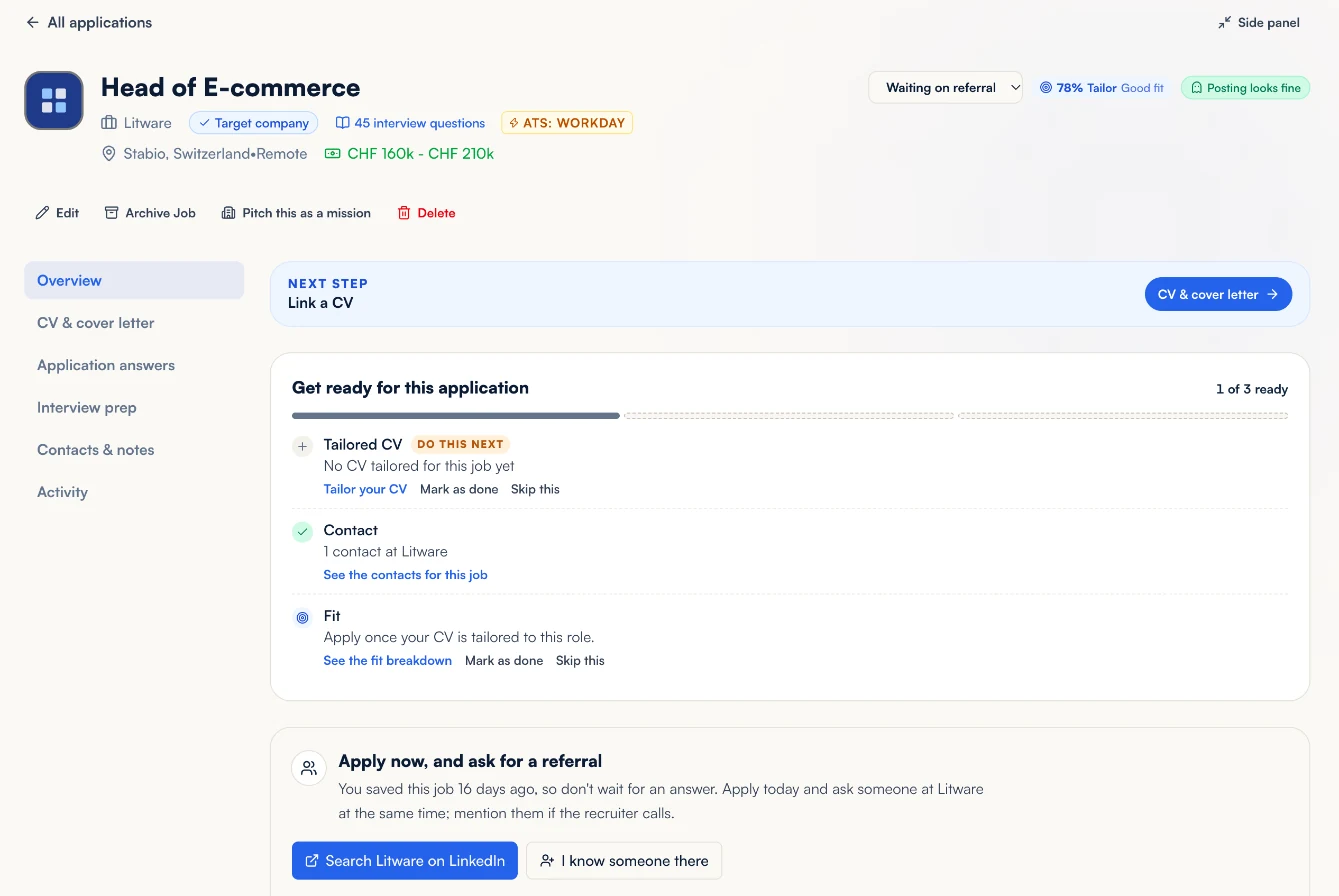
One workspace for each application
Open a job and everything about applying to it is on one page: the posting, the fit breakdown, the CV and cover letter you are sending, your drafted answers, interview prep, contacts, notes and the full history. A short checklist says what is left before you apply, and you can mark any item done or skip it.
- Get ready for this application: a tailored CV, a contact at the company, interview practice once you reach the interview stage, and the fit verdict, with one item marked as the next thing to do.
- Prefer a quick look? Minimize the workspace to a side panel over your tracker, and come back to the full page in one click.
- Tailor your CV, write the cover letter or practise the interview from the job, and you come back to the same application.
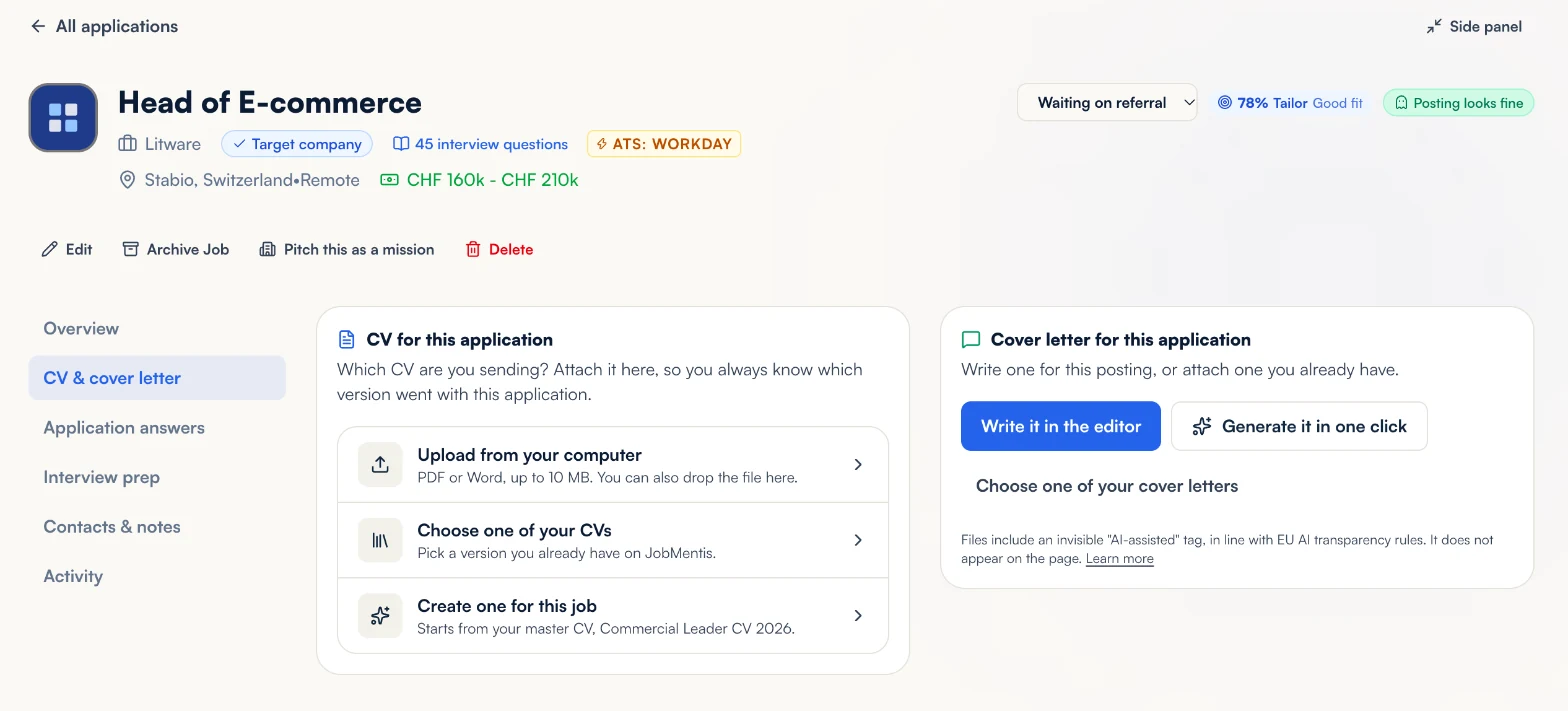
Which CV did you send them?
The workspace remembers. Upload the file you sent, pick a version you already have on JobMentis, or create one for this job from your master CV, and the application keeps its name, its type and the date you attached it. The cover letter sits beside it.
- A CV you upload for one application is filed under that job and never replaces your master CV.
- Tailor in the editor and review every change, or generate a tailored version in one click.
- Months later, when a recruiter calls, open the job and see exactly which version they have.
Notes, contacts and referrals
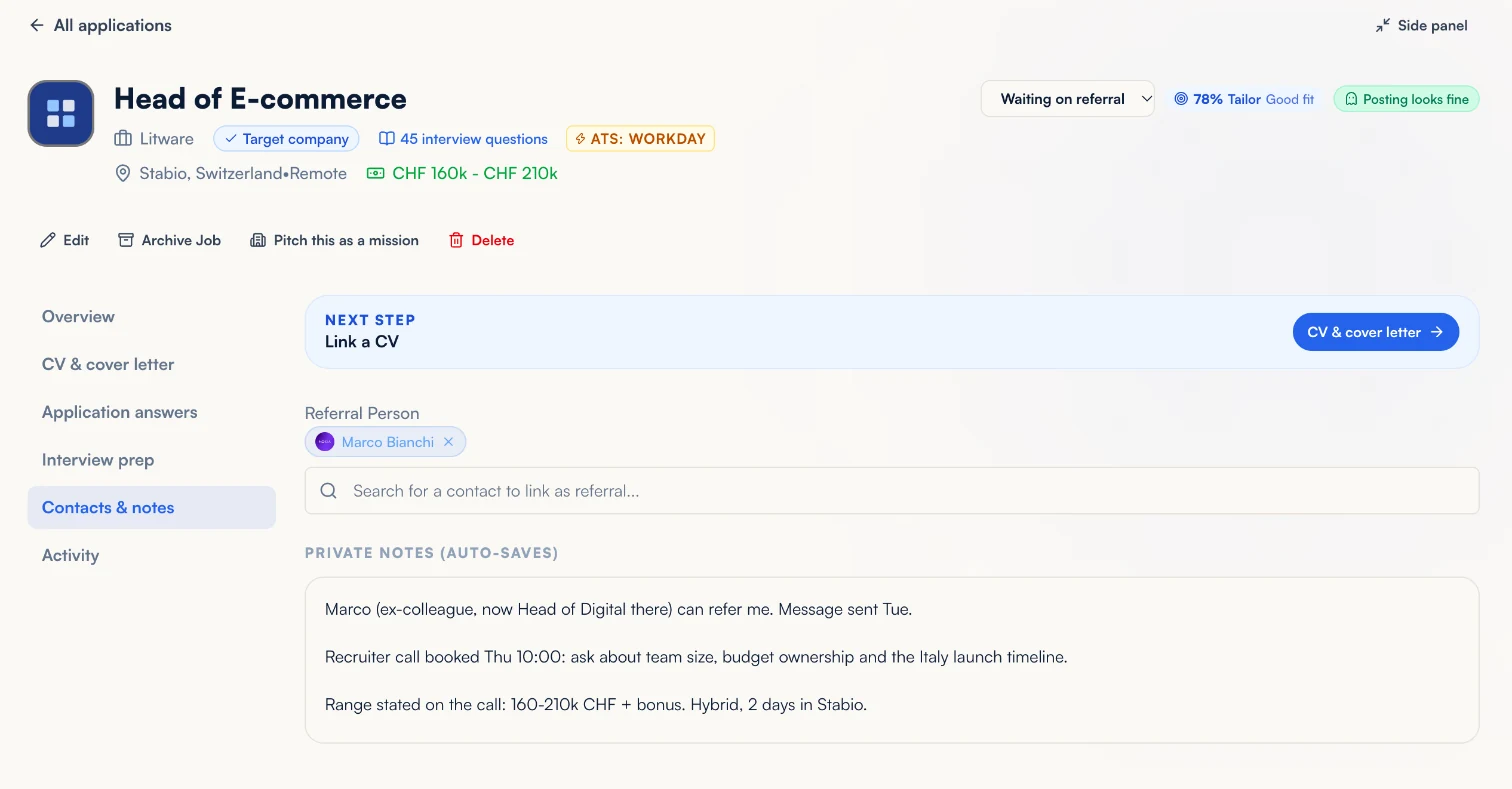
Each job keeps private notes that save as you type, the people linked to it and the referral you are waiting on. Asking someone inside before you apply is often worth the wait, so JobMentis tracks the ask and tells you when to stop waiting.
- Link a contact from your network as the referral person, or add someone new at the employer.
- The referral clock runs 72 hours from your first ask, or 7 days from when the posting appeared, whichever comes first. You can change both.
- Draft the ask and the follow-up from what the contact record says, then send them yourself.
- Notes stay private and are never shared with employers.
Is the job even still open?
Some postings are never meant to be filled, and some close without telling anyone. JobMentis gives every tracked job a posting health reading, shows what raised the risk and keeps watching: when a posting is taken down or reposted, the event lands in the job's history.
- A risk score with the signals behind it, such as no concrete detail, no closing date or an unusually long time online.
- Confirm a posting as real, or mark it as not real, and the reading follows your call.
- Closed and reposted events stay on the timeline, not only in a notification you dismissed.
Interviews, rejections and what they teach you
Log each interview round with its date and who you met, and prepare from the job itself: the questions this employer is known to ask, from our corpus of 2,200+ companies, and a mock interview set up for this role. When a rejection arrives, paste the email: what employers write is the only feedback most candidates ever get.
- Adding an interview round moves the job to Interviewing for you.
- After five closed applications, Pro reads your rejections together: where applications stop, how long employers take and what the letters have in common.
- Pro also finds the skill gaps that come back across your applications, with a plan to learn or prove each one.
- Pro drafts answers to application form questions from your Story Bank, at the length the form allows.
Save jobs from LinkedIn and job boards
With the JobMentis browser extension, a job you are reading on LinkedIn or on a careers site goes into your tracker in one click, with the full description. Start an application and the job is added for you; on Greenhouse, Lever, Workday and Ashby forms it can fill in your details.
Get the browser extensionWhat sits behind it
Your tracker, connected to real data
4
dimensions in every fit score: skills, experience, stories and career direction
2,200+
companies with an interview question bank, linked from your applications
113,000+
interview questions, each with what a strong answer shows
What is free, and what Pro adds
The tracker is free, with no limit on applications. Pro adds the analysis that needs more AI behind it.
Free
- Unlimited applications in list, table and Kanban views
- A fit score with its reasons for every job
- Posting health for every tracked job
- A workspace for each application, with its readiness checklist
- The CV and cover letter you sent, remembered for each job
- Notes, contacts, referrals and interview rounds
Pro
- Your own fit weights
- Rejection patterns across your closed applications
- Skill gaps that recur across applications, with a plan
- Drafted answers to application questions, grounded in your stories
Frequently asked questions
Is the JobMentis job tracker free?
Yes. Tracking applications is free and unlimited: add as many jobs as you like, move them through every stage and keep their notes, contacts and history. Pro adds deeper analysis, such as rejection patterns, recurring skill gaps across applications and drafted answers to application questions.
How is the fit score calculated?
Your CV is compared with the posting on four dimensions: skills (35%), experience (30%), the stories that prove them (20%) and career direction (15%). A model scores each dimension; the weighting and the verdict are fixed arithmetic. You get a percentage, a verdict (Go, Tailor, Stretch, Low pay or Skip) and the reason behind it.
Will the score change if I save the same job twice?
No. The same posting, CV and context give the same evaluation, so the number only moves when something real changes: a new CV, an edited posting or your own weights.
How do I know which CV I sent to a company?
Attach it to the application. Upload the file you sent, pick a version already on JobMentis or create one from your master CV, and the job keeps its name and the date you attached it. A CV uploaded for one application never replaces your master CV.
What happens when the job posting is taken down?
Nothing is lost. JobMentis stores the posting's own text when you save the job, so you can prepare for an interview weeks later. If the posting is closed or reposted, the event is added to the job's history.
What is a ghost job, and how does JobMentis flag one?
A ghost job is a posting with no real intent to hire soon. Every tracked job gets a posting health reading with the signals behind it, and JobMentis keeps checking whether the posting is still live. You can confirm a posting as real or mark it as not real.
Does it work with LinkedIn?
Yes. Paste a LinkedIn or careers-site link and JobMentis reads the posting for you. With the browser extension you can save a job from LinkedIn in one click, and an application you start is added to your tracker automatically.
Is my job search private?
Yes. Your applications, notes and documents are private to your account and are never shared with employers.
Know where every application stands
Start with the jobs you are chasing today. Your fit scores, documents and notes build up from the first one.
Start tracking for freeAlready have an account? Sign in