See your clients' job search between sessions, without asking for updates
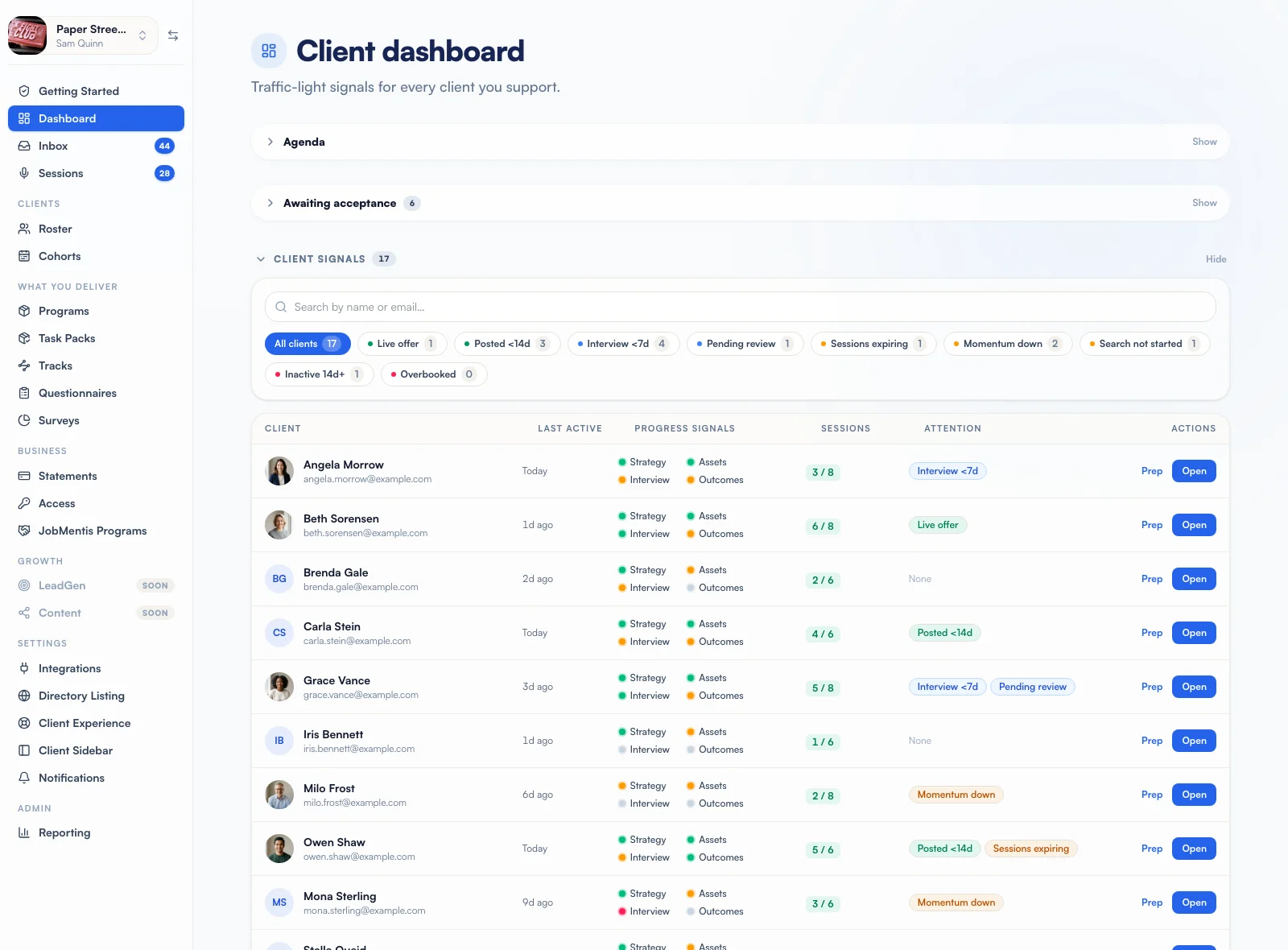
JobMentis counts each client's job search week by week: jobs saved, applications, interviews, new contacts, conversations and LinkedIn posts. You set up to 5 weekly targets the client also sees, and your dashboard flags who is slowing or has stalled before the next session, with the reason.

How it works
Clients work in their own tools
The tracker, the network and LinkedIn posts feed the weekly count as they go.
You set targets
Up to 5 numbers, live from the next Monday, visible to the client.
The dashboard sorts the roster
Signals and flags show who needs you this week, and why.
The digest catches the rest
Slowing and stalled clients reach your inbox, at most once a fortnight per level.
What counts as progress
Doing the search counts; opening the app does not. A job saved, a first move to Applied, a move to Interviewing, a new contact, a conversation logged, a LinkedIn post published. A conversation counts once per contact per day, so saving the same meeting twice is still one. Each client's week runs Monday to Sunday in their own time zone, and a comparison with last week always stops at the same moment, so a Monday morning never reads as a collapse.
Weekly targets your client can see
Set up to 5 numbers: jobs saved, applications, new contacts, conversations and LinkedIn posts. Your client sees them on their program page and dashboard, with this week's counts moving as they work. A change always applies from the next Monday, so a client is never marked short on a week they have nearly finished. Clients can also set their own goals and share them with you.
On track, slowing or stalled, and why
A badge next to each client reads on track, slowing or stalled, and hovering it gives the reason and the days it judged. Stalled means no search action for 10 days. The first 14 days on your roster are always too early to call, and a client still building their CV in the foundation weeks is never shown in red.
One dashboard, one digest
The dashboard gives every client four signals (Strategy, Assets, Interview, Outcomes) plus flags in four tones: good news such as a live offer, a date that is yours such as an interview within seven days, drift such as sessions running out, and stops such as fourteen days inactive. Your digest arrives on your cadence, only when something changed, laid out by client with the most urgent first.
Works with
- Session notesCapture every sessionYour notetaker's recording comes back as client tasks, your follow-ups and a summary you approve.
- CohortsRun cohortsOne Day 1, weekly releases at your hour, CV checkpoints and group targets for the whole intake.
- Programs and task packsDeliver the programTask packs that release on each client's own week and tick themselves off when the work is done.
FAQ
Questions coaches ask
Is this surveillance of my clients?
It counts search actions, not screen time, and the client sees the same numbers you do, against targets they can see. When coaching ends the tracking stops and the weekly record is deleted.
How up to date is it?
The client page is live. Dashboard flags refresh once a day, and "slowing" only changes when a week ends. It is a weekly picture for planning sessions, not a real-time alarm.
What about a client who is on holiday?
There is no pause yet, so a client away for more than 10 days will read as stalled. A coach-set pause is planned.
Want to see it on your own program?
Bring one program and two or three real clients to a call. We build the first schedule with you and show you what the console would flag this week.