Career coaching software: what it should do between your sessions
Career coaching software is the system a job-search coach uses to deliver a program, not just book it: tasks released on schedule, session recordings turned into follow-ups, each client's search visible between sessions, feedback from a whole group. This guide covers what to expect, and how JobMentis does it.
What is career coaching software?
Career coaching software is a platform that delivers a coaching program to job seekers and shows the coach what each client did between sessions. It is different from coaching practice-management software, which books sessions, sends invoices and stores contracts, but never sees the job search itself.
For a career-transition coach, most of the work that decides the outcome happens between sessions: the CV rewrite, the target-company list, the applications, the networking conversations, the interview practice. Software that cannot see that work leaves the coach opening every call with "so, how did it go?", and spending the first fifteen minutes rebuilding the picture.
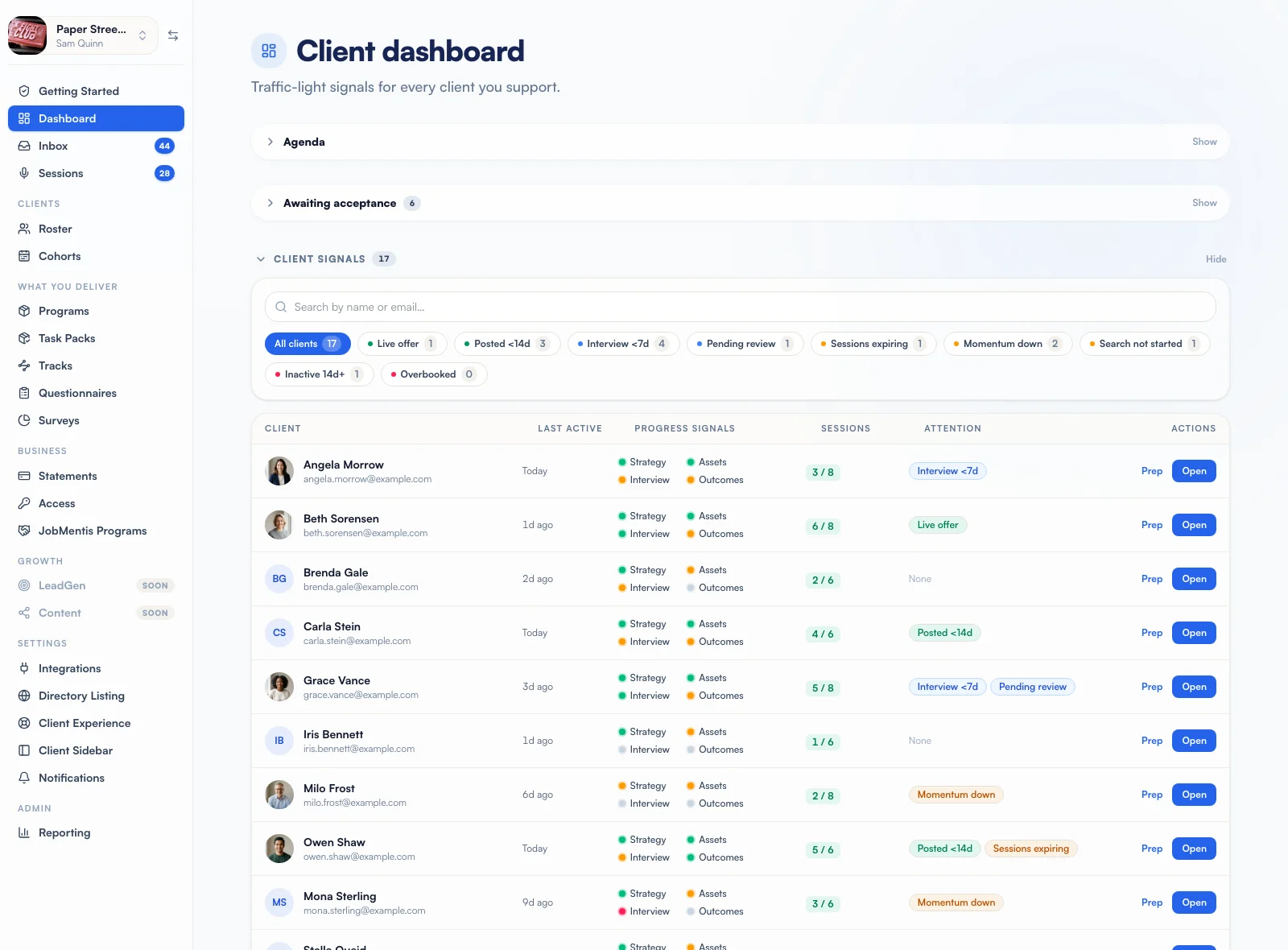
The six jobs career coaching software has to do
A coach running a repeatable program needs six things from the platform. Each one has its own page showing how JobMentis handles it.
- Programs and task packsDeliver the programTask packs that release on each client's own week and tick themselves off when the work is done.
- CohortsRun cohortsOne Day 1, weekly releases at your hour, CV checkpoints and group targets for the whole intake.
- Session notesCapture every sessionYour notetaker's recording comes back as client tasks, your follow-ups and a summary you approve.
- Client accountabilitySee the work between sessionsApplications, interviews, contacts and conversations counted weekly, with targets and early flags.
- Surveys and questionnairesAsk the right questionsQuestionnaires for each client's intake, anonymous surveys for the whole group.
- Your clients' sideGive clients a workspaceYour logo, their program, your messages and the job-search tools, in their own language.
Career coaching software vs practice-management tools
Practice-management tools run the business side of coaching; career coaching software runs the delivery. Most established coaches already have the first and are missing the second. The two sit side by side: JobMentis connects to Calendly and Google Calendar rather than replacing them.
| - | Practice-management tool | Career coaching software |
|---|---|---|
| Booking and payment | Its core job: calendars, packages, invoices. | Reads your existing booking tool and counts sessions against the program. |
| Program content | Files and links in a client portal. | Task packs that release on each client's own week and tick themselves off when the work is done. |
| The job search | Invisible. | Applications, interviews, contacts and conversations counted week by week. |
| Session notes | A notes field you fill in by hand. | Your notetaker's recording drafted into client tasks, follow-ups and a summary you approve. |
| Groups and cohorts | One client at a time. | A shared Day 1, weekly releases, CV checkpoints and group targets. |
| Proof of progress | What the client tells you. | What the client did, with the reason behind every flag. |
Where AI belongs in career coaching software
AI should do the drafting and the counting. The coach decides what a client receives. That is the line JobMentis holds, and it is worth asking any vendor where theirs is.
- A session recording is drafted into tasks and notes, then waits for your approval. Autopilot exists, but it is off until you turn it on, waits four hours by default so you can step in, and holds the whole session back if any task cannot be found in the transcript.
- The session prep brief is built from the client's records. Its AI opener is rejected if it quotes a number that is not in those records, and you get the facts alone instead.
- Transcripts are read once to draft the session and are not kept. Only the link to the recording stays.
- Scores your clients see, like the CV audit, are reproducible from the document alone. They never change because of something said in a session.
What to check about client data before you choose
A career coach handles CVs, salary expectations, reasons for leaving and sometimes health or family disclosures. Ask every vendor where that data lives, who can open a client's account, and how it is deleted.
- You can open a client's account only while they allow it, and every visit appears on their own activity timeline with your name and how long you stayed.
- Each workspace is isolated, and a practice with several coaches can give each coach their own roster.
- When a client ends coaching, tracking stops and their weekly activity record is deleted. Their account and their work stay theirs.
- Anonymous surveys do not store which link answered, so neither you nor JobMentis can see whose answers are whose.
- Health, religion, union, orientation and nationality details are stripped before a coach's workbook is imported into a client's account.
- Deletion is one request and runs across every database, file store and connected service the account touches.
A buyer's checklist for career coaching software
Eight questions to put to any platform before you move a program onto it.
- Do scheduled tasks count from each client's own start date, or from one shared calendar date?
- When a task points at a tool, does it tick itself off when the client does the work, or do they have to report it?
- Can you see applications, interviews and networking between sessions without asking for an update?
- Does it connect to the notetaker you already use, and do you approve what reaches the client?
- Can you run a cohort with one Day 1 as well as one-to-one clients who all started on different dates?
- Are group surveys genuinely anonymous, including to the vendor?
- Can clients use it in their own language, even if you work in English?
- What happens to a client's data, and your access, the day coaching ends?
Who it is for, and who it is not
A good fit
- You run a repeatable program, one-to-one, in groups or in cohorts.
- You coach career transitions and job searches, and your clients' outcomes are jobs.
- You are taking on more clients and the admin is growing faster than the coaching.
- You already use a notetaker, or would if the notes went somewhere useful.
Probably not the right tool
- Executive or leadership coaching where the outcome is not a job search.
- Two or three clients at a time with a fresh approach for each: you are faster by hand.
- You need booking and invoicing only: a practice-management tool does that well.
Read from the product
The numbers this guide quotes
5
Notetakers that send sessions in as drafts: Grain, Granola, Fireflies.ai, Fathom, SpeakApp.
4
CV checkpoints per cohort, each one scored, with the change from first to last.
3
Replies a survey needs before any answer is shown, so a small group stays anonymous.
6
Languages your clients can use the product in, while you work in English.
FAQ
Questions coaches ask
What is the best software for career coaches?
The best software for a career coach is the one that sees the job search, not only the calendar. Look for task delivery timed to each client's own start, visibility of applications and interviews between sessions, session notes that turn into client tasks, and group delivery if you run cohorts. Booking and invoicing are well served by practice-management tools, which can sit alongside.
Do I need a notetaker to use JobMentis?
No. A notetaker (Grain, Granola, Fireflies.ai, Fathom, SpeakApp) saves you the write-up, but you can paste a transcript from Zoom, Teams or Meet and get the same draft, or write a session up yourself in the same review screen.
Does it work for one-to-one coaching as well as groups?
Yes. One-to-one is the case where every client has a different start date, and every release is counted from each client's own start. Cohorts add a shared Day 1 on top for programs that run as a group.
Does it replace Calendly or my booking tool?
No. Connect Calendly and JobMentis counts the bookings as sessions against the program, and you choose which meeting types count, so a free intro call never spends a session. Google Calendar shows your agenda read-only.
How much does career coaching software cost?
JobMentis charges per active client per month, with no setup or platform fee, and you only pay for the months a client is active. The current list price and volume pricing are on the coaches page.
Can my clients see my private notes?
No. Your session notes stay private. Clients see only what you send them: the session summary you approve, and the tasks you agreed.
Is the coach console available in other languages?
The coach console is in English. Your clients use their side in any of 6 languages, and you can write your pre-session questions in each language yourself; nothing you write is machine-translated.
What happens to client data when coaching ends?
Tracking stops, your access ends, and the weekly activity record is deleted. The client keeps their account and their work. If they are coached again later, the last eight weeks are rebuilt from their own tracker.
Want to see it on your own program?
Bring one program and two or three real clients to a call. We build the first schedule with you and show you what the console would flag this week.